

I try not to judge other professional web design firms. Really, I do. But often clients come to us to fix (or completely redesign) websites that missed the mark from the start. At the risk of reigniting the “content is king” debate at OSD, I can quickly tell what went wrong 99 percent of the time: too much emphasis on visual design and not enough emphasis on user experience (UX).
What is user experience?
The term “user experience” has been around for a while, but its definition continues to evolve. Among other things, UX includes:
- Content – The words, illustrations, videos, sounds, etc. you use to present information.
- Information architecture – How your information is organized.
- Interaction design – How people interact with the site (for example, when they click on menus and type in form fields).
- Visual design – The aesthetics of your site.
In short, the best web design isn’t just attractive. It’s functional.
4 ways to improve your site’s user experience
1. Know who you’re talking to
Yes, I know that sentence ends in a preposition. Get over the grammar (or, to be exact, style) and get to what matters: If your website doesn’t connect with the right people, the best-looking web design in the world will mean nothing.
Before you plunge into design, define your buyer personas and determine:
- What motivates them?
- What goal are they trying to reach when they visit your site (take action, find information, etc.)?
- What terminology do they typically use?
By knowing that, you can do a better job of delivering the right message to the right people. You can also do a better job at this …
2. Ignore your internal silos
Good information architecture organizes information in a way that makes sense to the user, even if that isn’t how it’s organized within your company. For example, say you sell used cars. Which makes more sense: organizing according to how your sales staff is aligned, or organizing based on buyer motivations?
[grid]
[col-1-2]
INTERNAL FOCUS
Model A
Model B
Model C
Model D
[/col]
[col-1-2]
USER FOCUS
Family friendly
Sporty
Gas savers
Rough and rugged
[/col]
[/grid]
I’m not saying to completely ignore your brands or product categories. Just think about how you can create other paths through your site that help people achieve their goals regardless of your internal structure. In my 20-plus years doing digital content strategy, I’ve found this is the toughest challenge most people face when organizing their site.
3. Tier your content with a bite-snack-meal approach
This is another challenge I see over and over: saying too much too soon. There’s a time and a place for detail – but that place is rarely on your home page. There’s a simple fix for this problem: Break up your content into tiers: a “bite” for the scanners, a “snack” for people who want a little more, and a “meal” for people who want a lot.
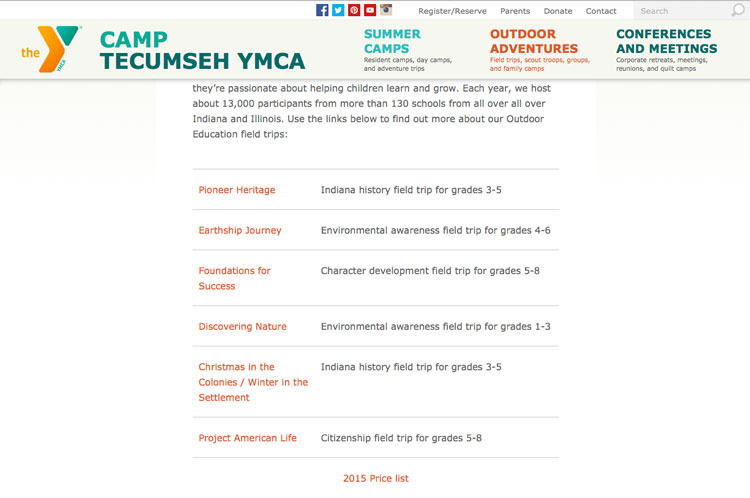
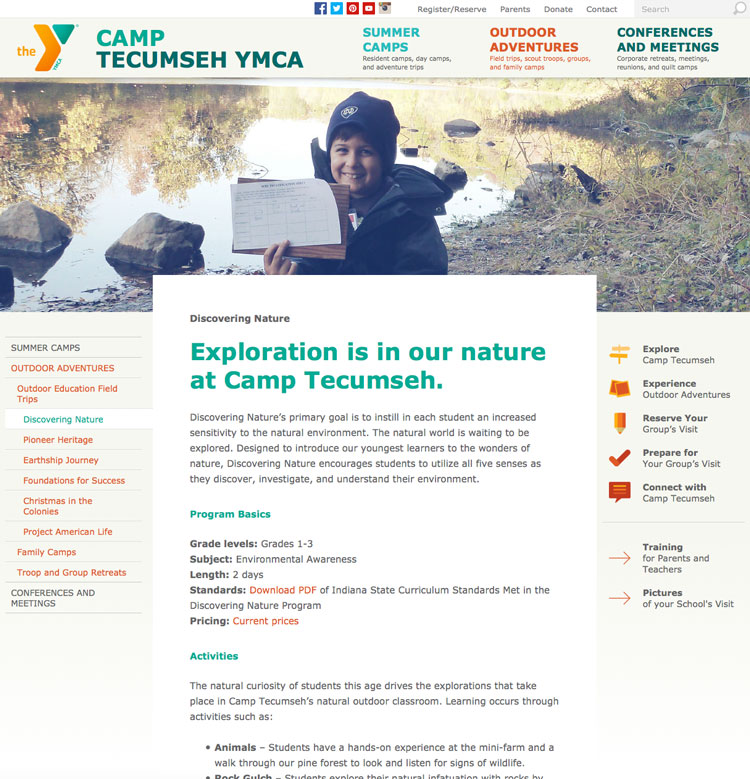
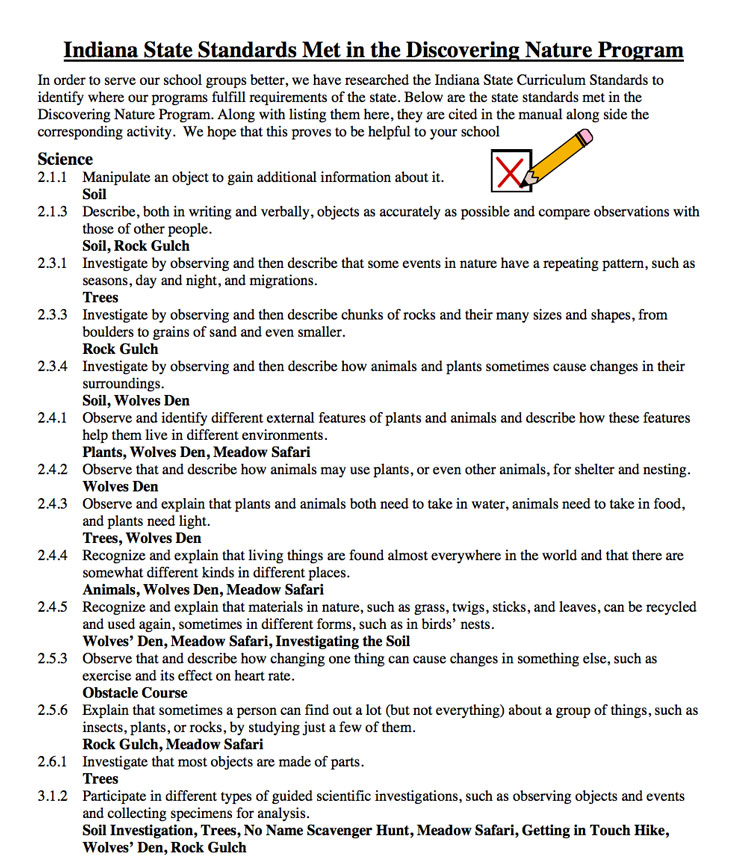
Here’s an example of how we presented all three tiers of content when describing the “Discovering Nature” field trip on the Camp Tecumseh YMCA website:
The bite: A quick description (Discovering Nature: Environmental awareness field trip for grades 1-3) on a landing page
The snack: A full page of content describing the program length and elements
The meal: A downloadable PDF explaining all of the curriculum standards the program meets
4. Make your content easy to scan
That doesn’t mean presenting a page full of bullet points. That will make you look straight out of the 90s – and overwhelm many of your readers. What I mean is to use text styles, graphics, and white space in a way that helps people find what they’re looking for quickly.
In particular, pay attention to the “F pattern.” According to eye-tracking studies by Nielsen Norman Group and others, readers typically scan the top of a web page from left to right, and then move down the page focusing on other attention-getting elements such as subheads and links. When you look at a heat map, it creates a pattern that looks like the letter F.
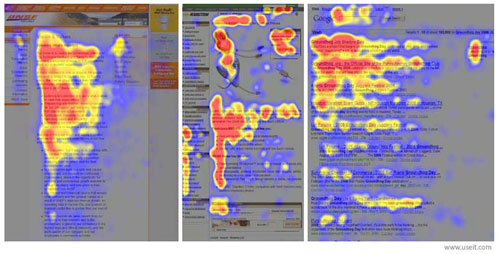
To write and design for the F pattern, try to:
- Put the most important content at the top
- Break up content into chunks and label each chunk clearly with a subhead or caption
- Put the most important and descriptive words at the beginning of your subhead or caption
- Format the most important link (the primary call to action) as a button so it’s easy to find
I should mention that these practices aren’t just good for readers. They’re will also help with your search engine optimization. The search engine bots read content much like people do.
How we ensure UX excellence at OSD
At OSD we don’t have a single person who “owns” user experience. Instead, each member of the team uses UX best practices in their role as a designer, developer, or writer. It’s everyone’s responsibility to ensure our clients’ sites look good and perform well – for both the site owner and the user who is trying to achieve a goal.
- Paige
Paige Moore is the content director for OSD. In addition to being our chief word nerd, she handles site architecture for websites and strategy for content marketing programs.

[/col] [col-1-6 data-mobile="hidden""] [/col] [/grid] [grid] [col-1-6] [/col] [col-2-3 class='paging clear'] « 3 tips for using social media for your business Use email marketing to amplify (and target) your content » [/col] [/grid]